
CATIA performance: slow assemblies, broken links, drawings that won't update
We record the CATIA release and update level, then time open, expand, save and drawing update separately. For V5 we compare CGR Visualisation Mode with Design Mode and check cache, CATSettings and external links. For 3DEXPERIENCE CATIA we also record representation loading and the file-transfer path.
Problems this covers
- A large CATIA product takes many minutes to open or expand
- Performance is fine at one site or on one workstation and poor elsewhere
- Links and references broke after files were renamed, moved or replaced (Send To, save-as)
- Drawings don't update, or update slowly, when the 3D changes
- Saving to 3DEXPERIENCE, or opening from it, is slow or fails part-way
- Things got worse after a service pack, FD, graphics driver or network change
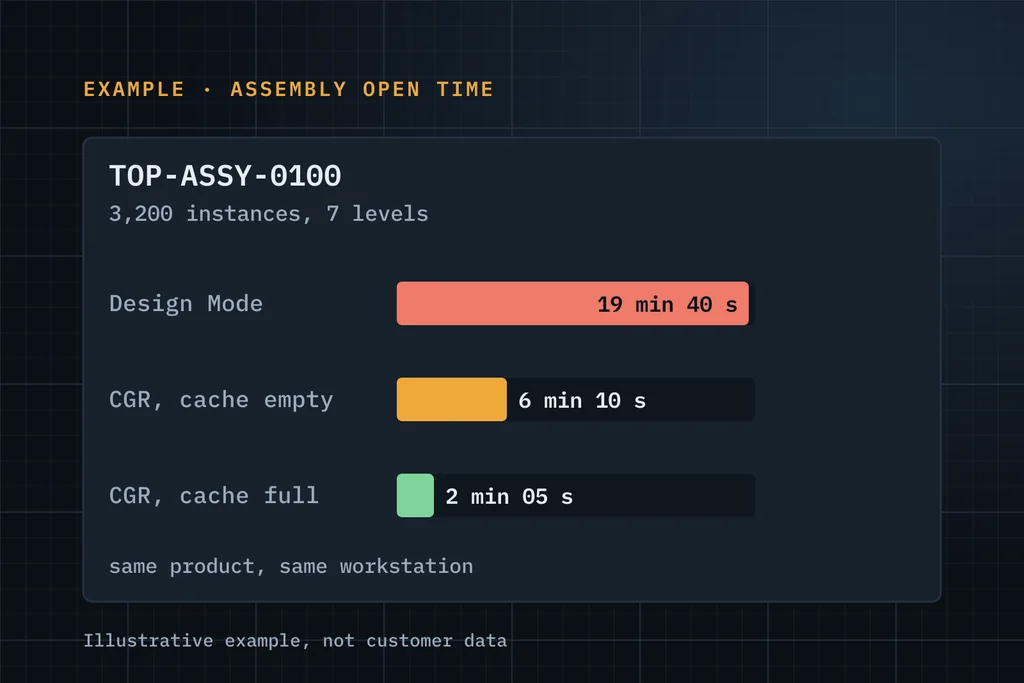
Measured before and after every change
Measure
Record release and update level, cache state and loading mode, then time open, expand, save and drawing update on a named dataset.
Check the set-up
V5: Cache Management, CGR versus Design Mode, CATSettings and environment. 3DEXPERIENCE: representation loading, client level and transfer path. Both: workstation, graphics driver and memory.
Check the data
Unique references versus instances, heavy purchased parts, external links and drawing-to-3D links.
Change one thing, re-measure
Each change is tested against the baseline, so you know which settings or data changes made the difference.
What you receive
- A baseline and re-test timings, with the test conditions recorded
- Causes ranked by measured impact
- Recommended settings (cache, loading mode, CATSettings) and modelling practices
- Help repairing broken links safely
Three ways to start
Start with free support
Up to 5 hours to understand the issue and tell you what to check or do next. No obligation.
Request free supportEssentials assessment Paid
A written problem statement, recommended next steps, a proposed scope and an effort estimate. You approve the fee before it starts.
Ask about an assessmentDiscuss a scoped project
Upgrade, migration, integration, customisation or configuration with a defined goal. We reply with questions, then a proposal.
Discuss a projectWhat to include in your first message
- CATIA V5 (release, SP) or 3DEXPERIENCE CATIA (release, FD)
- Which operation is slow: open, expand, save or drawing update, and how long it takes
- Approximate size: unique parts and instances, levels
- Whether it is slow everywhere or only for some users, sites or machines
- What changed recently: data, release, driver, hardware or network
A few lines are enough. Please leave out passwords, confidential CAD files and customer data.
Common questions
CATIA V5 and 3DEXPERIENCE CATIA?
Both, as separate investigations. File-based V5 is about cache, CGR, CATSettings and links on disk. CATIA on 3DEXPERIENCE adds representation loading and file transfer from the platform.
Do you need our CAD files?
Not at first contact, and never by email. If we need to see data, we agree a secure method, usually a remote session in your environment.
Is slow performance a hardware problem?
Sometimes. Timing alone can't tell you. Comparing the same assembly and loading mode on another workstation, with the cache state recorded, shows whether the next change belongs in the workstation, the network, the settings or the model.
Can you train our engineers afterwards?
Yes. A short session on loading modes and cache, using their own assembly, helps the improvement stick.
Describe the failed operation, release and deployment.
Describe it in a few lines. If it's a good fit, we'll use up to 5 hours of free support to understand it and tell you plainly what to check or do next.