Why 3DEXPERIENCE-to-ERP BOM transfers fail silently, and how to design for recovery
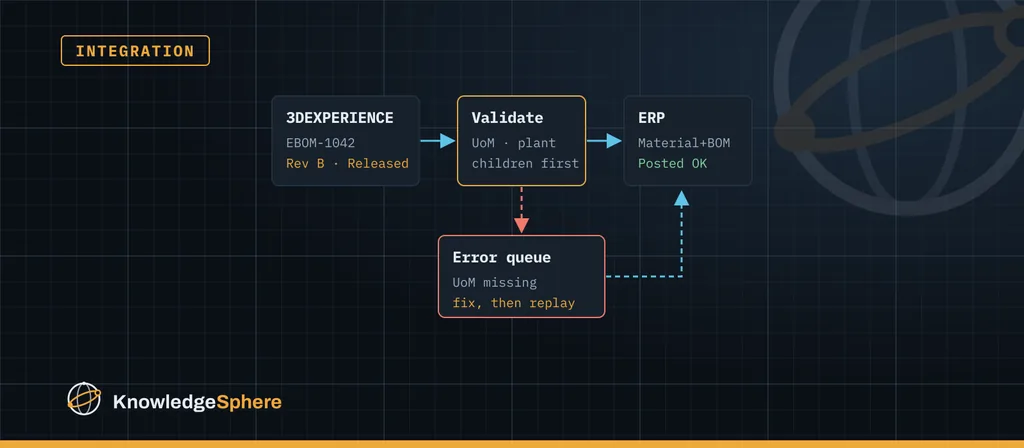
A PLM-to-ERP integration can work on the day it goes live and still fail months later, when someone in production planning notices that a released BOM never arrived, or arrived with a missing component, and nobody can say when it went wrong.
Applies to: a design checklist for 3DEXPERIENCE (or another PLM) to ERP interfaces. Validate each point against your receiving ERP transaction and middleware.
The interface usually didn't crash. It failed quietly on one transfer, and nothing told anyone. Check these failure modes against your receiving transaction and transfer logs, with the design choices that prevent them.
1. Data the ERP needs simply isn't in PLM
The receiving ERP transaction may require plant, base unit of measure, material type, procurement or valuation fields whose owner sits outside engineering. If the interface fills these with defaults, or skips the part when they are missing, you get either wrong data or no data. Record the authoritative source and validation rule for each field that specific transaction requires.
Design for it: decide where every mandatory ERP field comes from, write it down, and check it before release. A business rule that blocks promotion when a part is missing its unit of measure is cheaper than an error at 2 a.m.
2. Parents arrive before their children
In many ERP configurations (SAP material BOMs are a common example) a BOM can only be created once every component item already exists. Check the behaviour of your receiving transaction. Where it applies, sending parts and BOMs in parallel, or in arbitrary order, makes some BOMs fail because a child is still in the queue.
Design for it: process in dependency order. Create or update materials first, then BOMs from the bottom of the structure up, and hold a BOM until its children have been confirmed.
3. Retries create duplicates
A timeout does not mean the ERP didn't receive the message. A naive retry can post the same change twice, or create a second material.
Design for it: define the transfer identity with the receiver and middleware owners: the source identity and version, the operation and the destination scope needed to tell a legitimate change from a repeat. Test repeated delivery, an uncertain acknowledgement and a corrected payload, including concurrent retries, so a correction is never silently discarded as a duplicate.
4. Revision and change numbers don't line up
PLM thinks in revisions and maturity states; ERP thinks in change numbers and validity dates. If nobody has decided how a Rev C release maps to an ERP change, the interface guesses.
Design for it: agree the mapping between PLM revision, ERP change number and effectivity date with both teams, and include it in the mapping specification.
5. Errors go to a log file nobody reads
Many interfaces write failures to a server log. The log rotates, the error disappears, and the BOM is simply never there.
Design for it: every failed message goes to a persistent error queue with a status, the reason in plain language and the original payload. Someone owns that queue, and a failed item can be fixed and replayed with one action.
6. Large structures time out
A flat test BOM with twenty lines behaves very differently from a production assembly with several thousand lines and many levels.
Design for it: test with your largest real structures, paginate or split large payloads, and set timeouts based on measurements rather than defaults.
7. Nobody checks that the two systems still agree
Even a well-built interface drifts over time: manual edits in ERP, a failed replay, a change made during an outage.
Design for it: run a scheduled reconciliation that compares released items and BOM structures in PLM with what ERP holds, and reports the differences. A daily report showing no differences is good evidence, but only for the fields, filters and cut-off time the comparison includes.
A short checklist
| Check | Question to ask |
|---|---|
| Mapping | Is there one documented owner and version of the field mapping? |
| Validation | Are ERP-mandatory fields checked before release in PLM? |
| Ordering | Are materials always created before the BOMs that use them? |
| Idempotency | Can the same message be sent twice without side effects? |
| Error queue | Can a failed transfer be seen, fixed and replayed by the business? |
| Volume | Has the interface been tested with the largest real assemblies? |
| Reconciliation | Is there a regular report comparing PLM and ERP? |
Each check you can't answer identifies a control to test. Reconcile a known released structure against ERP, including component identity, quantity, unit, effectivity and transaction status, and investigate every difference before replaying a transfer.